🎥 LIVE DEMONSTRATION
See how to convert bank statements to QBO format in 3 seconds
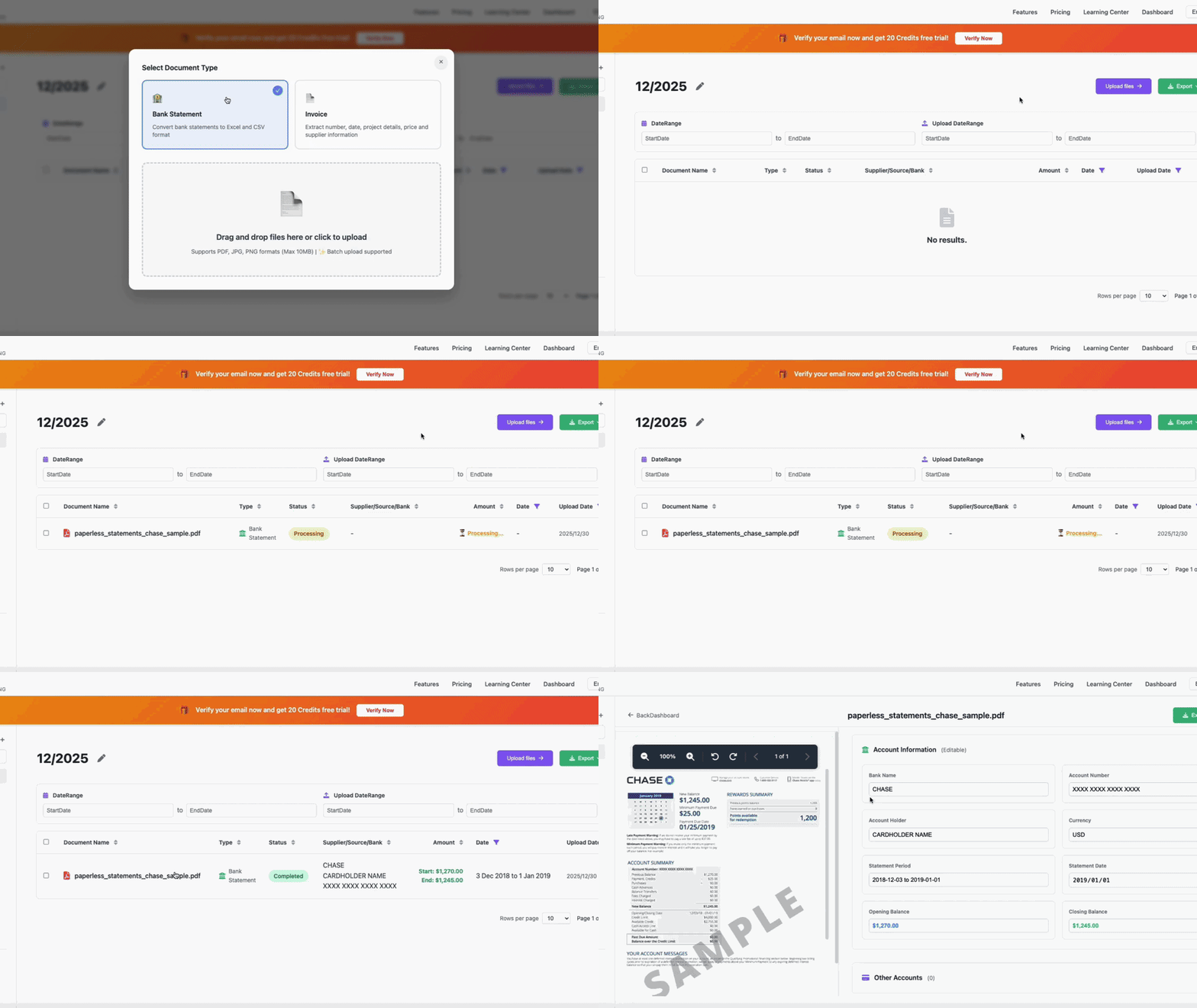
⚡ 3s
Average Processing
🎯 98%
Accuracy Rate
💰 $5.59
Starting From /Month
Import your bank statements directly to QuickBooks Online in 3 seconds. 98% accuracy, free 20-page trial.
After processing your bank statement, VaultCaddy offers multiple export formats. Here's how to select QBO format for QuickBooks Online:
VaultCaddy supports multiple export formats for different accounting software:
QuickBooks Online has powerful AI features for transaction categorization and analysis, but it can't extract data from PDF bank statements. That's where VaultCaddy comes in as the perfect complement.
AI Features:
Limitations:
Perfect Combination:
Upload your bank statement PDF to VaultCaddy
VaultCaddy AI extracts all transactions in 3 seconds
Download QBO file formatted for QuickBooks Online
Import to QuickBooks Online and use QBO's AI features
Everything you need to know about converting statements to QBO format
Yes! QBO files can be directly imported to QuickBooks Online. Go to Banking → Import Data → Import from file, then select your QBO file. QuickBooks will automatically recognize the format and import all transactions.
VaultCaddy supports 100+ banks worldwide, including all major US banks (Chase, Bank of America, Wells Fargo), UK banks (NatWest, HSBC, Barclays), and banks from Australia, Canada, Europe, and Asia.
VaultCaddy's AI achieves 98% accuracy in extracting and converting bank statements to QBO format. All transactions are automatically categorized and formatted for QuickBooks Online.
Yes! VaultCaddy offers a free 20-page trial. No credit card required. Start converting your bank statements to QBO format today.
No, QuickBooks Online cannot extract data directly from PDF bank statements. QBO's AI features work on data that's already imported (categorization, anomaly detection), but it requires bank feeds (API connections) or manual CSV uploads. VaultCaddy fills this gap by extracting data from PDF statements and generating QBO files that can be directly imported into QuickBooks Online.
VaultCaddy and QuickBooks Online work perfectly together: VaultCaddy extracts data from PDF bank statements (which QBO cannot do), generates QBO format files, and then you import into QuickBooks Online where QBO's AI features (categorization, anomaly detection, Finance Agent) take over. It's a complementary relationship - VaultCaddy handles PDF extraction, QBO handles accounting and analysis.
If you encounter any issues importing your QBO file, our support team is here to help. We also offer alternative formats (CSV, Excel) if needed. Contact us at support@vaultcaddy.com for assistance.
Join 500+ businesses using VaultCaddy to automate their QuickBooks Online imports.