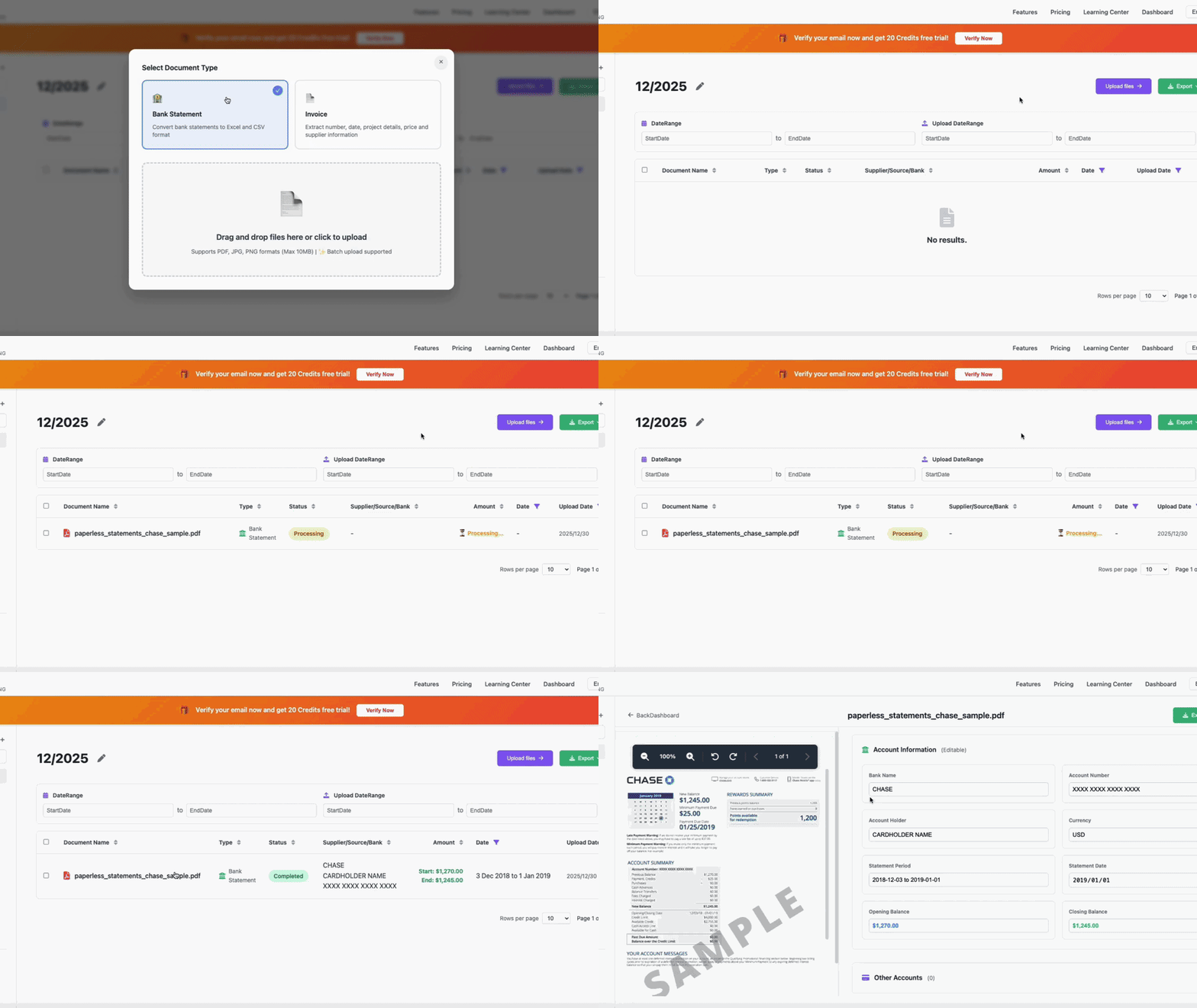
🎥 LIVE DEMONSTRATION
See how to convert bank statements to QBO format in 3 seconds
⚡ 3s
Average Processing
🎯 98%
Accuracy Rate
💰 $2.88
Per Month
100 Pages Included
Import your bank statements directly to QuickBooks Online in 3 seconds. Save $200+/year with our flexible pricing. Free 20-page trial, no credit card.
Why pay 10-15x more? Get enterprise-grade QBO conversion at a fraction of the cost.
Flexible subscription with 100 pages included monthly. Only pay $0.038/page when you need more!
After processing your bank statement, VaultCaddy offers multiple export formats. Here's how to select QBO format for QuickBooks Online:
VaultCaddy supports multiple export formats for different accounting software:
QuickBooks Online has powerful AI features for transaction categorization and analysis, but it can't extract data from PDF bank statements. That's where VaultCaddy comes in as the perfect complement.
AI Features:
Limitations:
Perfect Combination:
Upload your bank statement PDF to VaultCaddy
VaultCaddy AI extracts all transactions in 3 seconds
Download QBO file formatted for QuickBooks Online
Import to QuickBooks Online and use QBO's AI features
Everything you need to know about converting statements to QBO format
We offer the most flexible pricing in the market:
Compare: Desktop QBO converters like MoneyThumb ($225) and 2QBO Convert Pro ($349) require expensive one-time purchases. VaultCaddy's flexible monthly pricing saves you $190-315 in the first year alone, with no upfront costs!
Yes! You get a completely free 20-page trial with:
After the trial, you only pay $2.88/month (includes 100 pages) - incredibly affordable with zero commitment!
Desktop software like MoneyThumb ($225) and 2QBO Convert Pro ($349) are expensive because they:
VaultCaddy's advanced AI and cloud approach allows us to:
Result: Professional-grade AI tools at 90% lower cost ($2.88/month vs $225-349 upfront) than traditional desktop software. No compromise on quality!
Result? Professional-grade tools at 7-10x lower cost than traditional desktop software. No compromise on quality!
Yes! QBO files can be directly imported to QuickBooks Online. Go to Banking → Import Data → Import from file, then select your QBO file. QuickBooks will automatically recognize the format and import all transactions.
VaultCaddy supports 100+ banks worldwide, including all major US banks (Chase, Bank of America, Wells Fargo), UK banks (NatWest, HSBC, Barclays), and banks from Australia, Canada, Europe, and Asia.
VaultCaddy's AI achieves 98% accuracy in extracting and converting bank statements to QBO format. All transactions are automatically categorized and formatted for QuickBooks Online.
Yes! VaultCaddy offers a free 20-page trial. No credit card required. Start converting your bank statements to QBO format today.
No, QuickBooks Online cannot extract data directly from PDF bank statements. QBO's AI features work on data that's already imported (categorization, anomaly detection), but it requires bank feeds (API connections) or manual CSV uploads. VaultCaddy fills this gap by extracting data from PDF statements and generating QBO files that can be directly imported into QuickBooks Online.
VaultCaddy and QuickBooks Online work perfectly together: VaultCaddy extracts data from PDF bank statements (which QBO cannot do), generates QBO format files, and then you import into QuickBooks Online where QBO's AI features (categorization, anomaly detection, Finance Agent) take over. It's a complementary relationship - VaultCaddy handles PDF extraction, QBO handles accounting and analysis.
If you encounter any issues importing your QBO file, our support team is here to help. We also offer alternative formats (CSV, Excel) if needed. Contact us at support@vaultcaddy.com for assistance.
Join 10,000+ accountants and businesses using VaultCaddy.
Start FREE trial now - no credit card required!
No credit card required • 20 pages free • Cancel anytime • 98% accuracy