💡 Only What You Need, Refuse to Pay for Unnecessary
Bank Statement & Receipt AI Expert
Drop files here or click to upload
Supports PDF, JPG, PNG formats (Max 10MB)
✨ Experience AI Smart Processing
🎁 Free Trial 20 Pages • As low as $0.06/page
Upload Multiple Images/PDFs → AI Classify & Process → Platform Save/Export
• 98% Accuracy • Save 90% Time
Simple Three Steps, Quick Upload
Select Document Type → Drag & Drop → AI Auto-Processing
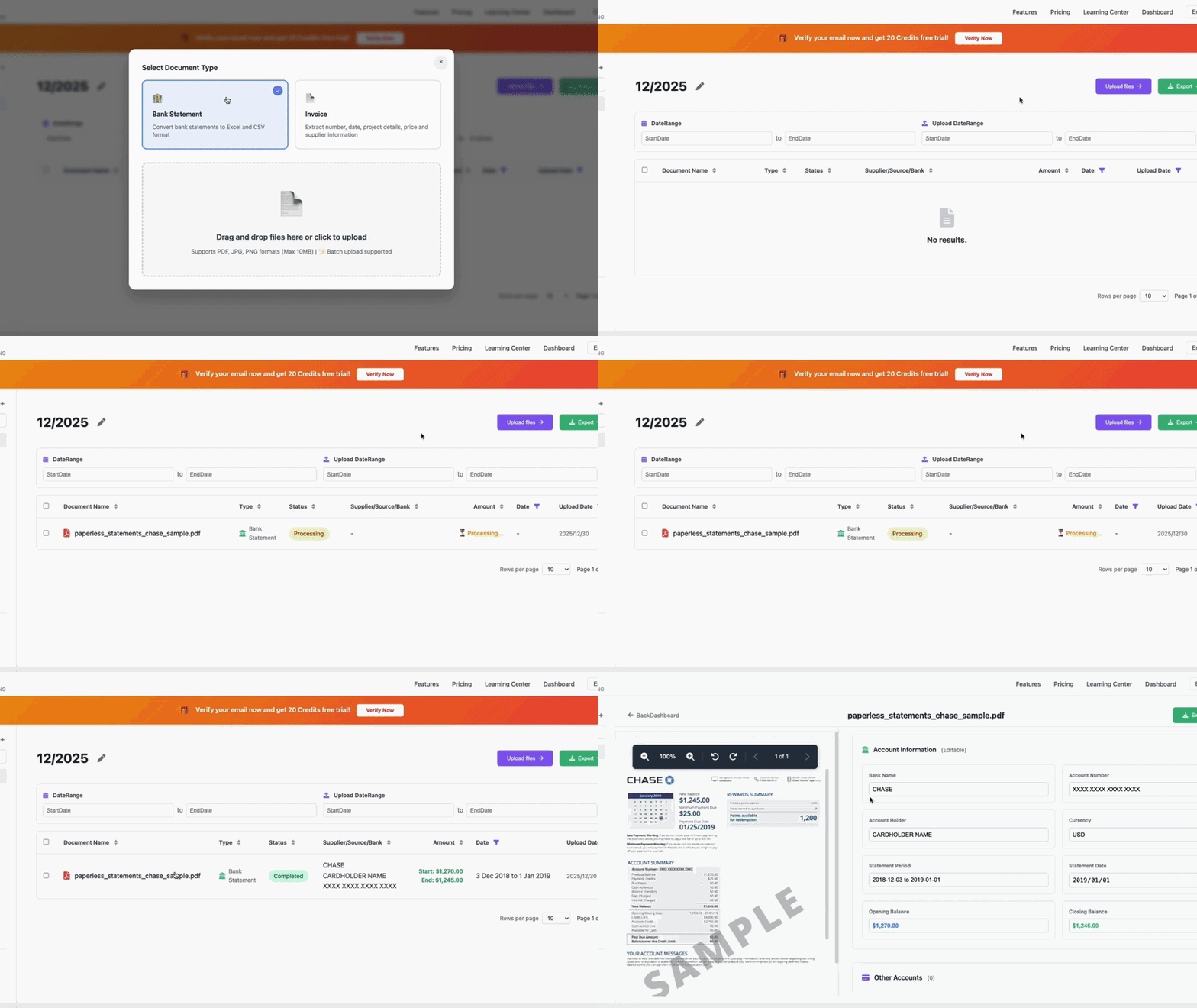
Select Type
Bank Statement or Invoice
Drag & Drop
Batch Processing Supported
AI Processing
Complete in 3 seconds
Three Simple Steps
Select Document Type → Drag & Drop → AI Processing

Select Type
Bank Statement or Invoice
Drag & Drop
Batch Processing Support
AI Processing
3 Seconds Extraction
FAIR AND AFFORDABLE PRICING
Easy Bank Statement Processing
Join thousands of businesses saving time on financial data entry. No hidden fees, cancel anytime.
Monthly
What's Included:
Yearly
What's Included:
VaultCaddy User Reviews

John M.
Financial Analyst
"VaultCaddy completely transformed how I handle bank statements. What used to take hours of manual input now takes just minutes, with accuracy that far surpasses other tools."

Sarah T.
Accountant at a CPA Firm
"Our firm processes hundreds of invoices From $4.88/month%. It's fast, reliable, and saves our team tremendous amounts of time."

David L.
CFO at a Mid-Sized Bank
"VaultCaddy is the only solution we found that can securely scale to thousands of documents. Bank-grade compliance features let us confidently use it across multiple departments."

Emily R.
Small Business Owner
"As a business owner, I don't have time to manually organize receipts and invoices. VaultCaddy automatically extracts and categorizes all data, making bookkeeping and tax filing much easier."

Michael K.
Auditor
"In the audit process, consistency and accuracy are paramount. VaultCaddy provides clean, structured output that makes compliance checks faster and easier. I highly recommend it to audit and compliance teams."

Sophia W.
Loan Officer
"Reviewing applicants' bank statements used to take hours. With VaultCaddy, I can analyze large volumes of records in minutes, making the loan approval process faster and more efficient."
📚 Learning Center
Learn how to maximize VaultCaddy for your financial documents
Manual vs AI Automation: Real Cost Comparison
In-depth analysis of hidden costs, learn how to save 40+ hours per month and transform repetitive work into business growth.
7 Best Practices for Personal Bookkeeping
Achieve financial freedom with AI tools, master efficient bookkeeping skills, easily manage personal finances.
Ready to Get Started?
Upload your first document now and experience the
Hang Seng Statement Parser: Why Choose VaultCaddy?
In the era of digital financial management, Hang Seng as a leading global financial institution generates massive amounts of statement data every month. For individual users, corporate finance teams, and accountants, manually processing these PDF statements is not only time-consuming but also error-prone. VaultCaddy was created specifically to solve this pain point, with deep optimization for Hang Seng statement formats.
Our AI engine has been trained on 10,000+ real Hang Seng statements, enabling it to accurately recognize Hang Seng's unique transaction record formats, date arrangements, currency symbol handling, and various special transaction types. Whether it's ACH transfers, Wire Transfers, check deposits, ATM withdrawals or credit card payments, VaultCaddy can accurately extract and categorize them.
Unlike traditional OCR tools or generic PDF converters, VaultCaddy deeply understands Hang Seng's transaction description logic. For example, Hang Seng merchant transactions typically include merchant names, location codes, and transaction timestamps. Our system intelligently parses this information to generate structured Excel spreadsheets where each column is clear and can be directly imported into accounting software or used for financial analysis.
🏦 Supported Hang Seng Account Types
Personal Checking
Perfect support for this account type's statement format, including transaction details, balance changes, interest calculations, and all fields.
Business Checking
Perfect support for this account type's statement format, including transaction details, balance changes, interest calculations, and all fields.
Savings
Perfect support for this account type's statement format, including transaction details, balance changes, interest calculations, and all fields.
Investment
Perfect support for this account type's statement format, including transaction details, balance changes, interest calculations, and all fields.
Special Note: VaultCaddy has dedicated recognition templates for all types of Hang Seng account statements. Whether you're using a personal checking account, business account, or savings account, we ensure 99%+ accuracy. For complex business accounts, we also support multi-account batch processing, uploading multiple statements at once with automatic categorization by account number.
⚡ Unique Advantages for Hang Seng Statement Processing
VaultCaddy offers specialized features for Hang Seng customers, ensuring accurate data extraction and seamless integration with your workflow. Our platform is continuously updated to match Hang Seng's latest statement formats and security requirements.